









Creating Adventure Sequences from Short Ideas
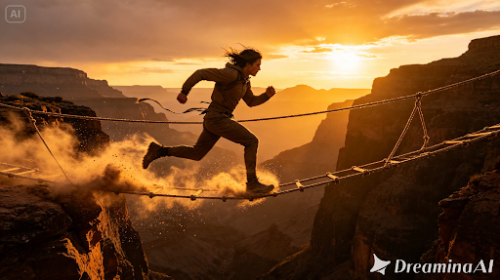
A single line can carry an entire adventure if it’s written right. A cliff edge. A chase. A door that shouldn’t be opened but gets opened anyway. Text to video tools can take that short idea and build it into something with real momentum now, and Dreamina’s Seedance 2.5 handles fast, high-energy motion well enough that a short adventure sequence genuinely feels like it belongs in a film rather than a rough animatic.

Why adventure ideas compress well into short clips
Adventure moments usually come down to one clear stake. Someone running out of time. A fall. A narrow escape. Nothing more complicated than that, which is exactly why they’re easier to turn into a short clip than a slower, layered story would be. There’s no backstory to explain first — the tension’s already sitting right there in the moment itself, ready to go.
Picking the beat that carries the most momentum
Skip the full journey. Go straight for the moment where the stakes actually peak. A few kinds of beats tend to render especially well:
- The instant right before a fall, jump, or narrow escape
- A chase caught mid-motion, urgency written into every frame
- The moment right after danger’s passed, once it finally sinks in
Go with the highest-tension second you’ve got. A torn map lying in the dirt, a dropped weapon, that’s enough context on its own. Trying to show the entire lead-up tends to drain the urgency right out of the one moment that actually matters.
What makes an adventure prompt feel urgent
A flat prompt names an action and stops there. An urgent one goes further, naming the pace, the instability of the setting, the physical reaction underneath it all, gritted teeth, a stumble, a desperate reach for something just out of grasp. “He runs across the bridge” hands a model almost nothing to work with compared to “he sprints across the swaying bridge, one plank cracking beneath his foot as he pushes forward anyway.”
Your three step path from idea to finished sequence
Step 1: Enter your prompt and add a reference if you have one
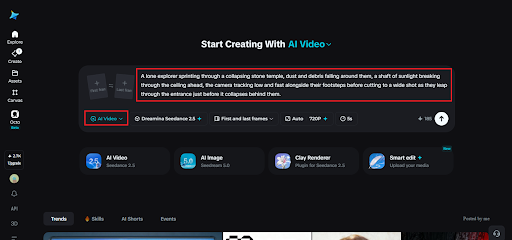
Head over to Dreamina’s AI Video section. Got a photo or concept sketch close to what you’re picturing? Upload it through “Add reference image” and build outward from there. No image on hand? Just work straight from text to video and describe the moment in full.
Here’s an idea for a clip: A lone explorer sprinting through a collapsing stone temple, dust and debris falling around them, a shaft of sunlight breaking through the ceiling ahead, the camera tracking low and fast alongside their footsteps before cutting to a wide shot as they leap through the entrance just before it collapses behind them.
Step 2: Choose Seedance 2.5 and generate
Once your prompt’s set, select Seedance 2.5, it’s built for exactly this kind of fast, dynamic motion. Pick a length that suits the beat you’re working with, then an aspect ratio: 16:9 if you’re going for a cinematic feel, 9:16 for anything headed to social media. Hit generate and let it process for a few seconds.
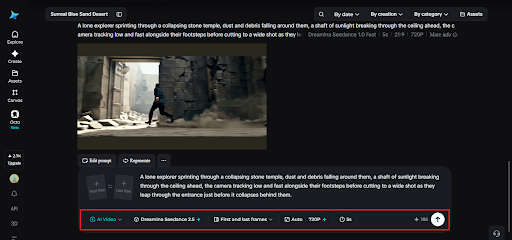
Step 3: Refine the energy and export
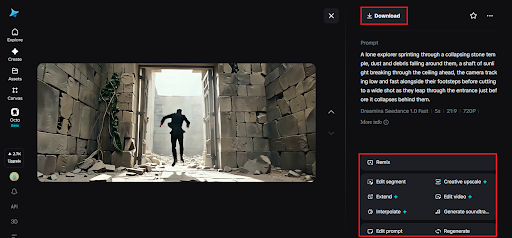
Before calling it finished, make sure the pacing actually feels urgent rather than sluggish. Upscale sharpens fine detail in fast-moving elements like dust and debris, while Generate soundtrack can add an intense score or ambient sound underneath to heighten the tension further. Once it feels right, export it and send it wherever it’s headed next.
Meet Seedance 2.5, the model built to help from prompt-writing to full creative input
Seedance 2.5 shifts the input fed to the model, going far beyond a mere line of text.
Up to 50 assets in one pass
Storyboard scripts, reference or style images, character designs, audio or soundtrack references, and shot descriptions can all be submitted at once, enabling the model to create from a full brief rather than a prompt.
One-click filmmaking, closer to reality
It moves AI farther up the process chain – rather than creating a snippet and iterating through prompts, the creator can simply submit the assets that would be used in an ordinary shoot.
Multilingual by default
Input is provided in a variety of languages, with special attention paid to Chinese, English, Spanish, Indonesian, and Malay, as well as full support for Thai, Arabic, Portuguese, Vietnamese, Japanese, and Korean.
Choosing visuals that heighten the stakes
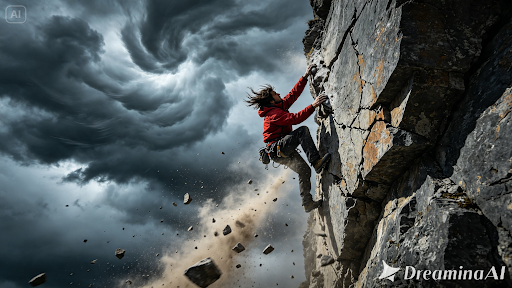
The environment pulls just as much weight as the character does in a scene like this one. Unstable ground, a closing space, harsh weather rolling in, all of it raises the stakes without a single line of dialogue needed. When writing a prompt for Seedance 2.5, describing how dangerous the environment itself is matters every bit as much as describing what the character’s doing inside it.
Where these adventure sequences are already being used
These clips have found real traction well beyond personal creative projects. Game developers pitch a level’s feel with one before it’s ever built. Authors promote an adventure novel with something more dynamic than a static cover could manage. Travel and outdoor brands lean on them to capture a sense of thrill that photography alone struggles to deliver. A short idea that used to sit as a single sentence in someone’s notes can now become a sequence people genuinely feel tension watching, and thanks to Seedance 2.5, it holds together with real, believable momentum from start to finish.
Bringing a short adventure idea to life used to mean stunt coordinators, location scouts, and a production budget most people never had access to. With Dreamina and the momentum-aware precision of Seedance 2.5, that same idea can go from a sentence to a finished sequence in an afternoon, no set or safety crew required. Stakes that once lived only inside someone’s imagination can now be felt by anyone watching, no matter how far that imagination originally traveled.